Ground Control + Blynk: Satellite IoT from Device to Dashboard
Turn raw satellite messages into a finished IoT product. See how Ground Control and Blynk combine global Iridium coverage with no-code fleet dashboards.
Published
June 4, 2026
Author
Henrik Holen
If your IoT devices operate beyond cell coverage, you've probably looked at satellite connectivity. The challenge isn't getting data off the device. Iridium has had global coverage for decades. The challenge is turning raw satellite messages into something useful: dashboards, alerts, fleet management, a mobile app your customers can actually use.
Ground Control makes that first part easier. They've been building Iridium satellite hardware since 2005, and their RockBLOCK product line is one of the most widely used satellite transceivers in IoT. Small, rugged, global coverage from pole to pole. Their Cloudloop platform manages device subscriptions, data routing, and message formatting across their entire hardware range.
What Cloudloop hasn't included is the application layer. The dashboards, automations, user management, and mobile apps that turn raw satellite data into a product. That's where Blynk comes in.
Cloudloop now routes directly to Blynk
Ground Control has added Blynk as a native destination in Cloudloop. When a RockBLOCK device sends a message over Iridium, Cloudloop receives it, formats it, and forwards it to Blynk via HTTP Data Converter. The data lands in your Blynk template as datastream values, ready for dashboards, automations, and alerts.
The setup works in three modes:
Data Converter mode is the recommended approach. Cloudloop sends LingoMo-formatted JSON to a Blynk HTTP Data Converter, where a JavaScript decoder extracts the fields you care about and maps them to datastreams. This handles multi-device fleets cleanly, using an ICCID metadata field to route each message to the correct Blynk device.
CSV mode sends raw payload values mapped directly to virtual pins. Simpler to configure, but limited to one device per destination.
RTU mode is designed specifically for Ground Control's RockBLOCK RTU micrologger. Physical pin readings from the RTU map automatically to matching Blynk datastreams with no decoder needed.
What this means for satellite IoT products
The integration connects Ground Control's satellite hardware and airtime management with Blynk's full application platform. Once data arrives in Blynk, you get:
Web and mobile dashboards for your end customers, built with Blynk's no-code dashboard builder
Automations and alerts triggered by satellite data, with push notifications, email, and SMS
Fleet management across hundreds or thousands of satellite devices, with OTA firmware updates and device health monitoring
Multi-tenant customer management so each of your customers sees only their own devices, while you maintain a fleet-wide admin view
White-label mobile apps (Enterprise tier) published to the App Store and Google Play under your own brand
This is relevant for any product that operates beyond cell coverage: environmental monitoring stations, remote water infrastructure, maritime tracking, agricultural sensors, mining equipment, oil and gas assets. Ground Control's hardware handles the satellite link. Blynk handles everything from the cloud up.
Getting started
1. Set up your Blynk template. Create a device template in Blynk with datastreams for each value your device reports (location, temperature, battery, sensor readings). Add an ICCID metadata field for device routing.
2. Create an HTTP Data Converter in Blynk. Write a short JavaScript decoder that extracts values from Cloudloop's LingoMo JSON format and maps them to your datastreams. Copy the converter URL.
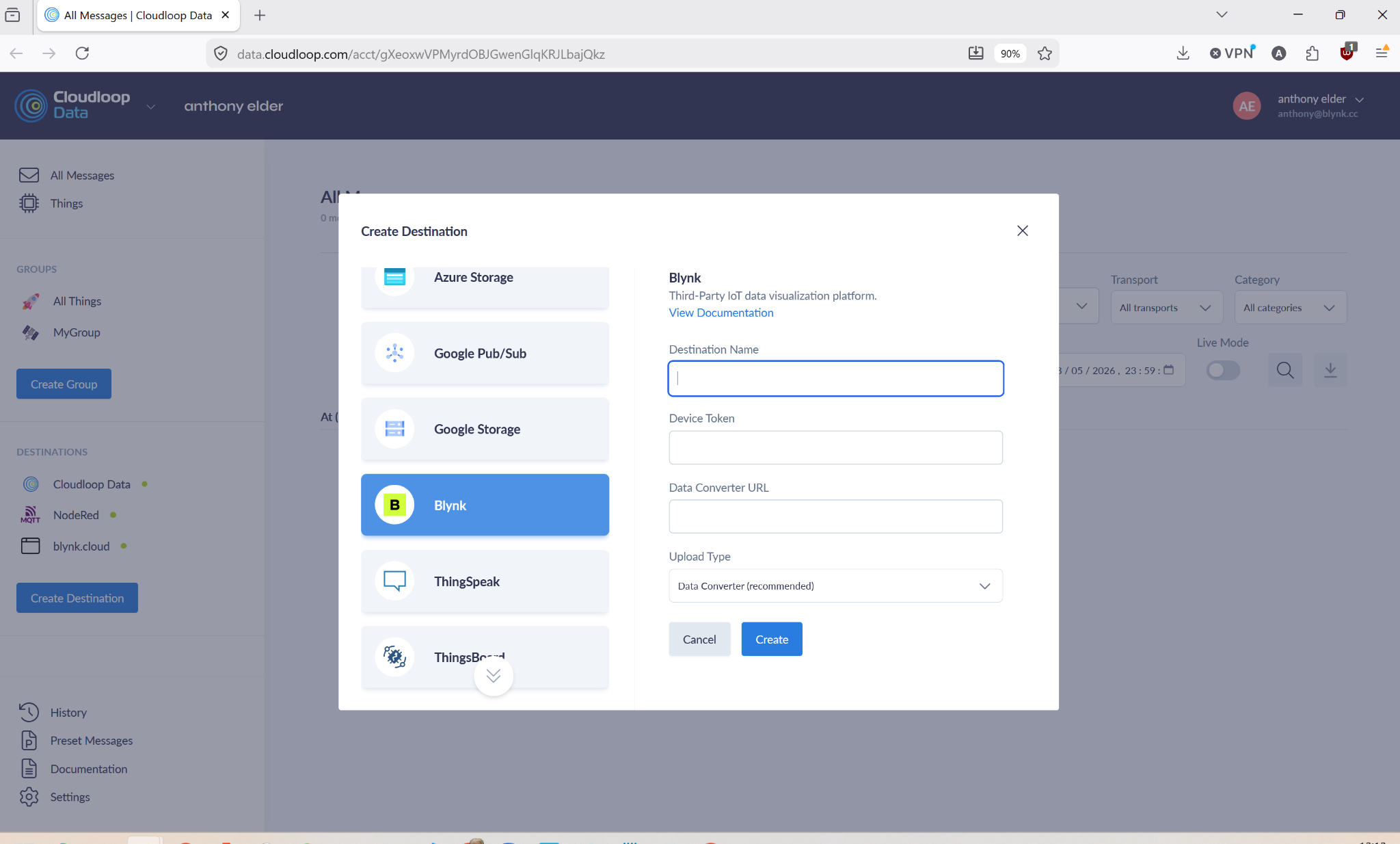
3. Add Blynk as a destination in Cloudloop. Paste the Data Converter URL as the webhook target. Assign the destination to your device group.
4. Send a test message. Trigger an uplink from your RockBLOCK device and verify the data appears in your Blynk dashboard.
Ground Control's documentation walks through the full setup with code examples for the Data Converter: Cloudloop Blynk Integration Guide.
For teams already using RockBLOCK hardware, this integration adds a complete application platform without building custom cloud infrastructure. For teams evaluating satellite IoT, it's one of the fastest paths from "device on a satellite network" to "product with dashboards and a mobile app."
Ready to get started?Create a free Blynk account and follow Ground Control's integration guide to connect your first satellite device.
Sign up for a newsletter
Get latest news from Blynk
Over 500,000 people already signed up our newsletter. We never spam.
Thank you! Your submission has been received.
Oops! Something went wrong while submitting the form.






.png)


