LoRaWAN for IoT: When Range and Battery Life Matter More Than Bandwidth
A practical guide to LoRaWAN architecture, trade-offs, and deployment patterns — for teams building sensor networks that need years of battery life, wide-area coverage, and low per-device costs.
Published
April 9, 2026
Author
Henrik Holen
Most IoT connectivity discussions start with bandwidth. How fast can the device talk? How much data can it push? Wi-Fi gives you megabits. Cellular gives you coverage and speed.
LoRaWAN starts with a different question: how long can the device last without being touched?
If you're deploying a temperature sensor in a cold storage warehouse, a soil moisture probe across 500 hectares of farmland, or a water level monitor in a remote catchment, you probably don't need megabits. You need a device that sends 20 bytes every 15 minutes and runs for five years on two AA batteries. That's the trade-off LoRaWAN is designed around.
What LoRaWAN Actually Is
LoRaWAN (Long Range Wide Area Network) is a low-power, wide-area network protocol built on LoRa radio modulation. It operates in unlicensed ISM bands (868 MHz in Europe, 915 MHz in North America, 923 MHz in parts of Asia), which means no SIM cards and no per-device cellular subscriptions.
The trade-offs are explicit. You get:
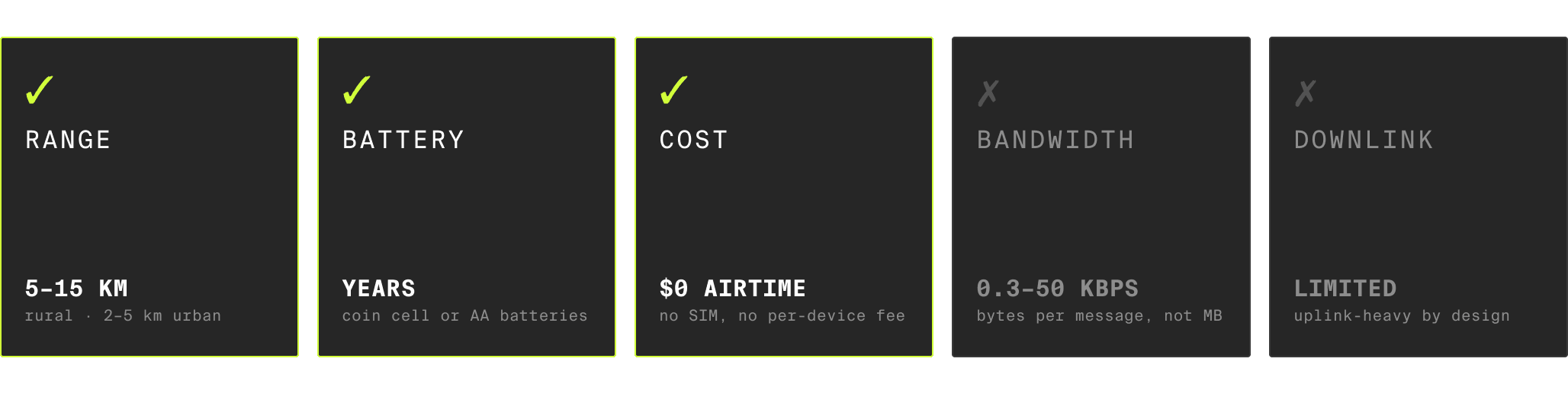
Range: 5-15 km in rural areas, 2-5 km in urban environments, from a single gateway
Battery life: Years on coin cell or AA batteries, depending on how often you transmit
Cost per device: No airtime fees. The radio module costs a few dollars. Ongoing cost is gateway infrastructure and network server
You give up:
Bandwidth: Typical data rates are 0.3-50 kbps. That's bytes per message, not megabytes
Latency: Devices are mostly asleep. They wake up, transmit, and go back to sleep. You won't be streaming video or sending commands in real time
Downlink capacity: Sending data to devices is limited. LoRaWAN is designed for uplink-heavy workloads where sensors report and the cloud listens
If you need to push firmware updates, stream camera feeds, or control actuators with sub-second response times, LoRaWAN isn't the right choice. If you need a sensor network that covers a large area, runs for years unattended, and costs almost nothing per device to operate, it's exactly right.
How the Architecture Works
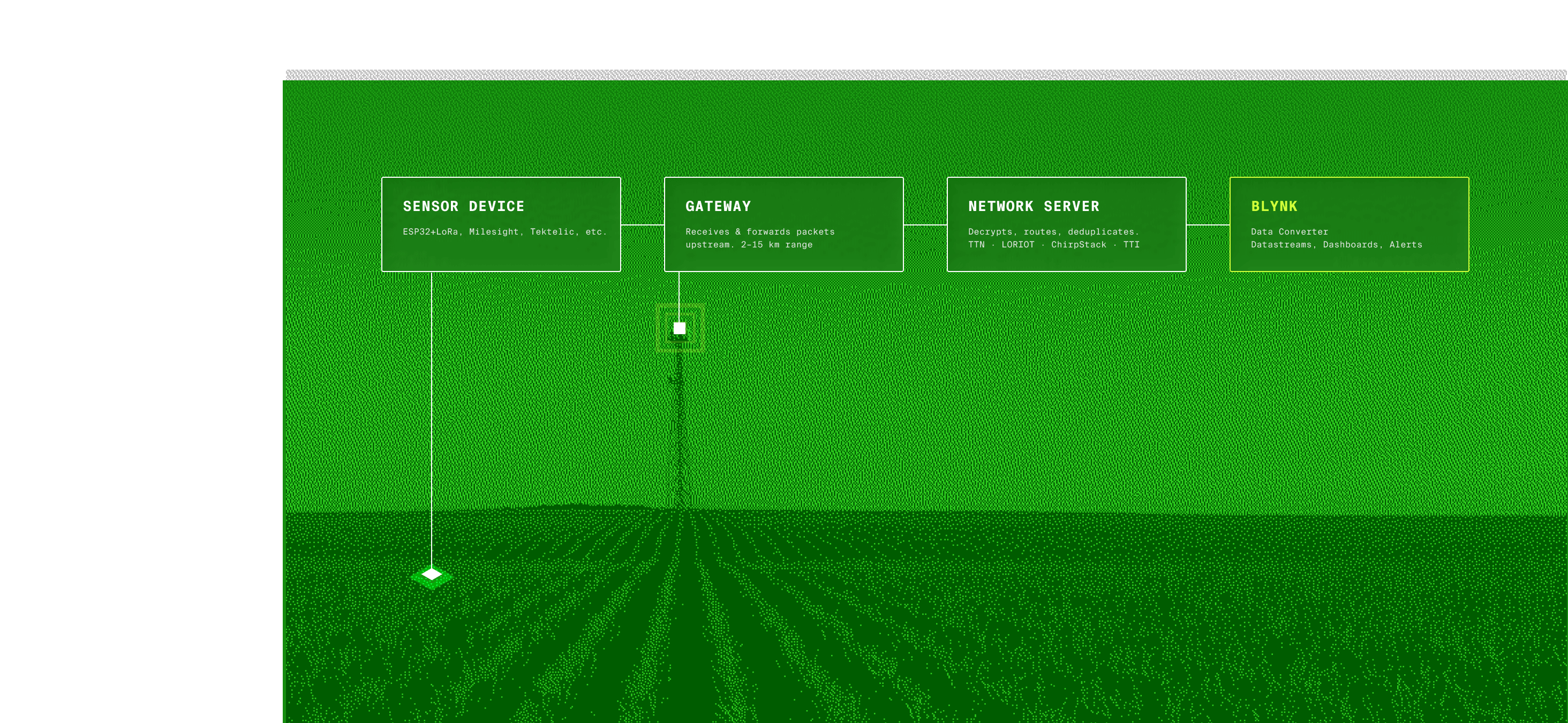
LoRaWAN uses a star-of-stars topology. Devices don't connect to the internet directly. They connect to gateways, which connect to a network server, which connects to your application.
Sensors (ESP32 + LoRa, Milesight, Tektelic, etc.)
→ LoRa radio (ISM band, up to 15 km)
→ Gateway (receives packets, forwards to network server)
→ Network server (TTN, LORIOT, ChirpStack, TTI)
→ HTTP webhook or MQTT
→ Cloud IoT platform (dashboards, alerts, mobile apps)
Each layer does one job:
Devices measure something and transmit a small packet. Most LoRaWAN sensors are purpose-built: a temperature probe, a door sensor, a GPS tracker. Some developers build their own with an ESP32 and a LoRa radio module. Either way, the payload is compact. A typical sensor reading is 10-50 bytes of binary or hex-encoded data.
Gateways are radio receivers. One gateway covers a large area and can handle thousands of devices simultaneously. They don't decode or process the data. They just forward raw packets to the network server. You can use community gateways on public networks like The Things Network (TTN), or deploy your own for private coverage.
Network servers handle the protocol-level work: encryption, device authentication, deduplication (if multiple gateways hear the same packet), and downlink scheduling. This is where you decide between public networks, managed services, or self-hosted software.
Your application receives clean, decrypted payloads via HTTP webhook or MQTT. From there, it's standard IoT platform work: parse the payload, map it to a device, update dashboards.
The Gateway Question
This is usually where LoRaWAN decisions get practical. You need gateways, and you need a network server. Here are the options:
Public networks (The Things Network): Community-operated gateways in many cities. Free for fair-use workloads. Coverage depends on volunteers, so verify availability before relying on it for production.
Managed network servers (LORIOT, The Things Industries): You provide the gateways, they run the infrastructure. Device management, payload routing, integration APIs, SLAs. This is the path most commercial deployments take.
Self-hosted (ChirpStack): Open-source network server you run yourself. Full control, no vendor dependency. Worth it if you have compliance or data sovereignty requirements.
A single indoor gateway costs $100-300. An outdoor gateway runs $300-1,000+. One gateway covers a warehouse, a campus, or several square kilometers of farmland.
> The network server choice doesn't lock you into a specific cloud platform. All of them deliver data via HTTP or MQTT. Your cloud platform receives payloads the same way regardless of which network server sits in the middle.
When LoRaWAN Makes Sense
LoRaWAN fits specific deployment patterns better than Wi-Fi or cellular:
Large-area sensor networks. Agriculture monitoring, smart buildings with hundreds of sensors, campus-wide environmental monitoring. One gateway covers the area. Devices run for years on batteries. Wiring is impossible or uneconomical.
Remote locations without Wi-Fi or power. Water level sensors in catchments, weather stations on hilltops, soil probes in fields. The device sits in a weatherproof enclosure, transmits every 15 minutes, and runs for years. No Wi-Fi network to connect to, no power outlet to plug into.
High device count, low data volume. If you're deploying 500 door sensors across a building portfolio, the per-device cost of cellular SIMs adds up fast. LoRaWAN devices cost a few dollars for the radio, and there's no recurring airtime fee per device. The gateway and network server are shared across all of them.
Retrofitting existing infrastructure. Adding monitoring to buildings, machinery, or infrastructure that was never designed for connectivity. LoRaWAN sensors are small, battery-powered, and don't need Ethernet runs or Wi-Fi coverage. Stick a sensor on a pipe, configure the network server, and data starts flowing.
Where LoRaWAN doesn't fit: anything that needs high bandwidth (cameras, audio), low latency (real-time control, actuator feedback), or reliable downlink (frequent configuration pushes). For those, use Wi-Fi or cellular.
Getting LoRaWAN Data Into Your Platform
The most common question from teams evaluating LoRaWAN is: how does this connect to everything else? The architecture means your cloud platform never touches the LoRa radio directly. It receives payloads from the network server, and those payloads are usually binary or hex-encoded data that needs parsing.
Blynk handles this through Data Converters and network server integrations. When LORIOT, TTN, or ChirpStack pushes a payload via HTTP, a Data Converter decodes the binary data, matches it to the right device using the device identifier (typically the DevEUI), and maps the values to datastreams. From there, it's the standard Blynk stack: web dashboards, native mobile apps, automations, alerts, fleet management.
Several LoRaWAN hardware partners already have ready-to-use templates in the Blynk console. Tektelic smart building sensors, Seeed Studio environmental monitors, Milesight devices, and Moko asset trackers all have pre-configured integrations that handle the payload decoding automatically. You connect the network server, add a device, and data appears on your dashboard.
The pattern is the same regardless of which LoRaWAN hardware or network server you're using: device transmits, network server routes, Data Converter parses, Blynk displays. If you've already connected devices to Blynk over Wi-Fi or cellular, the dashboard and app side works exactly the same.
Getting Started
If you're exploring LoRaWAN for a project:
Start with the sensor, not the network. Pick the LoRaWAN sensor that measures what you need. Milesight, Tektelic, Seeed Studio, and Dragino all make ready-to-deploy sensors for common use cases (temperature, humidity, water level, occupancy, GPS tracking).
Check gateway coverage. If you're in a city, look at TTN coverage maps. If you're deploying in a specific area, budget for one or two gateways. A single outdoor gateway covers several kilometers.
Pick a network server. For commercial deployments, LORIOT or The Things Industries are the safe choices. For development and testing, TTN or a local ChirpStack instance works.
Connect to your cloud platform. Point the network server's webhook at your platform's API, write a payload decoder (or use a pre-built one for your sensor), and you're live.
LoRaWAN isn't competing with Wi-Fi or cellular. It fills a different part of the connectivity map: long range, low power, low cost, low bandwidth. For the deployments where those trade-offs align, it's hard to beat.
Blynk is a low-code IoT platform used by 5,000+ businesses to build, deploy, and manage connected products. Start building →
Sign up for a newsletter
Get latest news from Blynk
Over 500,000 people already signed up our newsletter. We never spam.
Thank you! Your submission has been received.
Oops! Something went wrong while submitting the form.






.png)


